


Team Member: ChingYa Wang, Pushty Shah, Sahana Manjunath, VIswa Seelam
Job Tracking Application-JobHut
An integrated job status tracking mobile application for job seekers to better organize and follow up applied jobs in an efficient way
Overview
This project aims to identify a proficient approach to track job status for users who are applying for jobs from multiple platforms. According to user interviews, online surveys, and literature reviews, we recognized that the job application experience is one of the most intimidating experiences that involve a lot of uncertainty and confusion, especially at the job tracking stage. While there are multiple tools available to search and apply for a job through their website, but there is no single platform that can manage all the applied jobs from various websites.
By organizing all the constraints, we proposed a solution that could turn out to be the unique features for our application that set us apart from other tracking tools in the job market. We decided to apply syncing emails to the application as our main feature to automatically update the job status. In the end, we provided a service that can automatically load all the job application data into a single dashboard.
Why?
Motivation
Type
Graduate Capstone Project
Skills
User Research
Sketching
Prototyping
Usability Testing
Project Management
Role
UX/UI Designer
Project Manager
Duration
10 weeks
(Mar - Jun 2020)
Tools


The inspiration for conducting this project began while we dissecting everyday issues with our fellow students. In the process of looking for internships, everyone from the team felt that job search experience is tedious, time-consuming, and stressful.
What?
Problem
While there are multiple tools available to search and apply for a job through their website, but there is no single platform that can manage all the applied jobs from various websites.
Project Goal
Increase efficiency and reduce the total time taken to track applied jobs from various platforms.
Goal 1
Evaluate the effectiveness of the interface’s ability to follow-up on Job updates.
Goal 2
Improve the subjective usability of accessing the Job Hut application.
Goal 3

Design Thinking Process
Click on the circles to view each step
Empathize
Who is the user? What matters to the audience?
Literature Review
We identified a significant relationship between employment and mental health well-being. In a review of the literature (Vemuri, 2014) states even a job seeker with significant job experience struggles to manage their job application process. (Lim et al., 2018) a study conducted with 124 university graduates from Korea identified that about 40% of the students suffered from clinical depression, and 15% percent of the students reported with suicidal initiation caused by job-seeking stress.
Interview
To identify approaches used by users to track the jobs applied, we recruited eight participants who are between the age of 24-31, and who have applied for jobs through online job portals within the last six months. After transcribing the interviews and conducting inductive coding, our team found common themes and built an affinity diagram as below.

We discovered that the vast majority of our participants use spreadsheets and email as a source for job tracking. We additionally distinguished various issues with the utilization of email for job tracking leading job seekers to feel a spectrum of negative emotions. Job tracking is indeed a stressful experience for job seekers.

Online Survey
According to the result of the online survey, 76% of the participants have used more than two job portals to apply for jobs simultaneously. 60% of the participants do keep a note of their applied jobs, while only 56% of them update their notes frequently.(Figure 1) 63% of the participants search emails to track jobs. (Figure 2)

Figure 1.

Figure 2.
Competitive Research
We did competitive research to discover the advantages and constraints of existing websites and applications
that help job seekers to track their application. Some job search websites provide their own built-in tools to keep track of the applications, such as LinkedIn, Glassdoor, Monster, and CareerBuilder. At the same time, more job search management websites (e.g. Jibber Jobber, Huntr, Job Hero) appear in order to offer assistance specifically for job hunters.
We found out that all the job management tools rely on a manual data filling process which increases the user's cognitive workload to keep track of the job application status. However, we discovered the limitations could turn out to be the unique features for our applications that set us apart from other tracking tools in the job market. (See Table below)


Define
What are the user needs and challenges?
Persona & Scenario
We ask the important question, “Whom are we designing for?”
Two personas were created to understand our target users' expectations, concerns, and motivations. Moreover, we used user scenarios to visualize how users will use a product or service that can help to generate design ideas.


Ideate
What could be the possible solutions to user needs?
Card Sorting
To get better clarity on target audience domain knowledge as well as to create app information architecture, we conducted two rounds of card sorting using optimal workshop tool.

Among 28 cards, lots of cards were too confusing for participants to categorize into the existing categories.

The result showed higher agreement on the 5 categories, which then became the main navigation for our app.
Among 28 cards, lots of cards were too confusing for participants to categorize into the existing categories.
We made 28 cards and 4 categories. 23 out of 34 participants completed the task. However, results demonstrated that most participants failed to differentiate card labels on dashboard, settings, and profile categories due to added features that confounded users to differentiate between features and subpages labels. Even 11 participants abandoned the test. Besides, we found that the absolute time taken to complete the task was higher as users spent 4 min 45 sec to complete the card sorting.
For the second round, we refined content text labels into 15 cards and 6 categories without including any feature labels to avoid confusions.
We performed a closed card sort activity which helped us to define the categories for our top level and sublevels of navigation. Here,10 participants completed the task and the result showed 90% of the participants sorted cards accurately into respected categories and no participant abandoned the test. Besides, the average time taken to complete a task i.e., 2min 27sec. decreased into half of the time taken on first card sorting.

Completion Rate Increased


Completion Time
Decreased
Sitemap
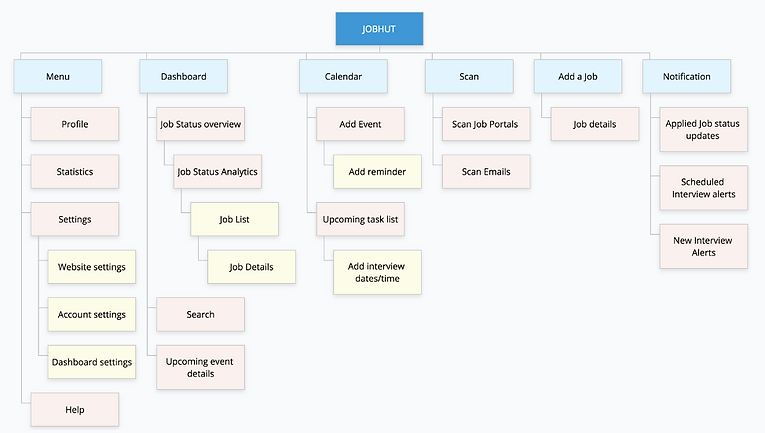
Sitemap was designed based on iteration done in card sort. Apart from the original five categories i.e., Dashboard, Calendar, Settings, Profile, Notification, we added Scan and Add a job to the main navigation, which is then sub categorized in the second level page.
We asked ourselves,
"Does our idea of syncing emails to automatically update the job status really work?"
Our survey result showed that 56% of the participants mentioned that they wouldn’t give permission to an application to access their email inbox even if just to retrieve the job-related emails. (Figure 3.) The main reason is because of the privacy issue and the concern about their confidential information in their email.

Figure 3.
Therefore, we came up with another feature if the user has not provided the email access, which is updating status manually by scanning job-related emails.
Sketch
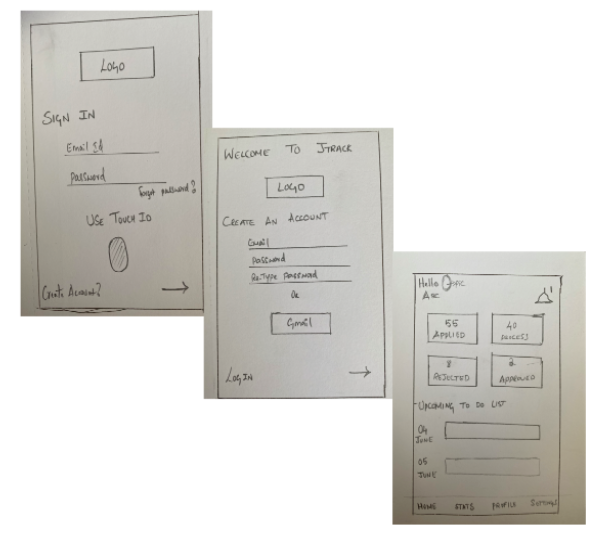
Based on user researches and content structure analysis, quick and dirty sketches were created by the team at the pre-design stage.

Prototype
How will the ideas be tangibly displayed? Which design really works?
Low Fidelity Prototype

Mid Fidelity Prototype
Test
How valuable and effective is the design solution?
Usability Test
Two rounds of usability tests were conducted by me and the team. For each test, we recruited eight participants who were above 18 years old, and who have applied for jobs through online job portals within the last six months. The tests were conducted virtually through Google Hangouts and Zoom.
For the first round, We synced job portals with our JobHut app during the onboarding process.


For the second round, we added tasks to test our features including scanning a job-related email, manually adding an applied job, and setting a reminder for a job interview on the calendar.

Design Iteration
According to the usability test results, we discovered some interesting findings. Then, I discussed with my team and we came up with the design changes as below.
Observation 1:
For the task of checking job details, one of the participants was not able to complete the task because he was confused between Applied jobs and Acknowledged jobs. Also, three of eight participants were confused between favorite jobs and Saved jobs while completing it, one of the participants asked: “What’s the difference between favorite and saved job?”


For the homepage, we focused on information that's more important for job seekers, including the overall job status and upcoming events.
The status sections on the dashboard were confusing for the users.
Therefore, we removed Favorite and Saved jobs, and renamed Acknowledgment as Accepted jobs.
Observation 2:
We observed that many of the participants were not able to find the job adding option on the dashboard page when we tested the manually adding a job function. Also, we discovered that the add a job button is required anywhere other than dashboard.


We decided to use bottom navigation for the most essential features of our application.
Put "add a job" option at the bottom navigation and moved settings, and profile to the hamburger menu.
Observation 3:
For the task of adding a reminder for an event on the calendar, we observed that most of the participants tried to click the dates on the calendar first and then clicked the add button later.

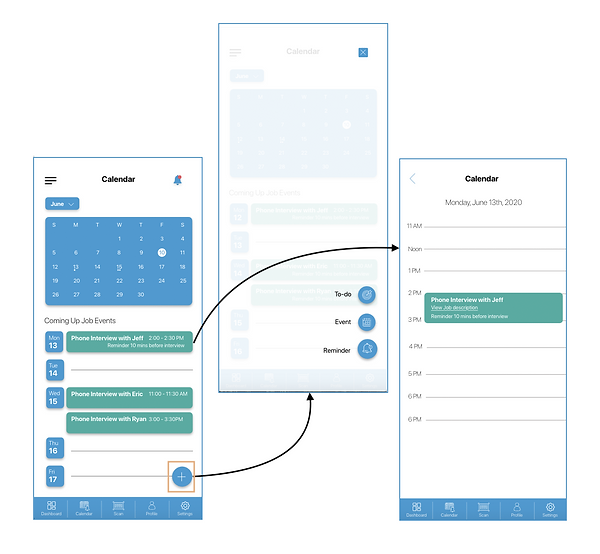
Changed dates on the calendar to be clickable and added a reminder button in the date page.
High Fidelity Prototype
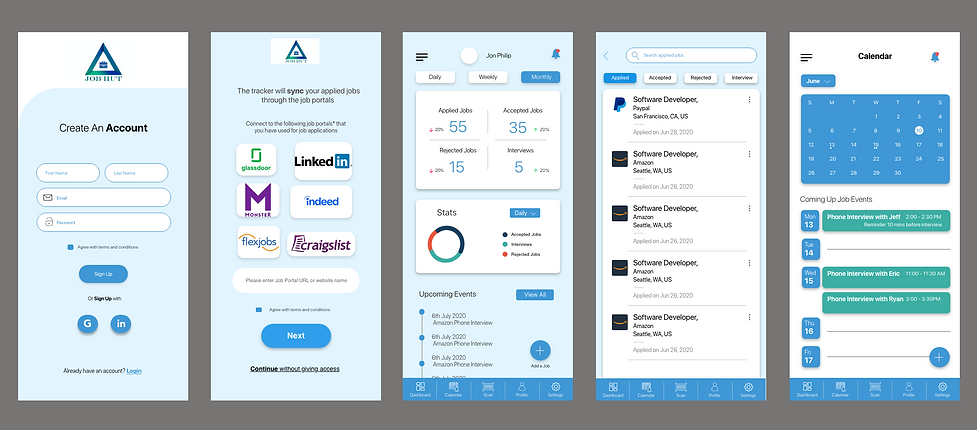
After refining the design through usability testing with potential users, JobHut mobile application was presented.


Tap to interact with
the prototype


Project Conclusion
Our JubHut mobile application received positive feedback from users who have suffered tedious job tracking experience. They indicate that an integrated job tracking system like JobHut can assist job seekers to manage their job applications more efficiently. Unlike the existing job tracking tools and the traditional methods such as notes, spreadsheets, and email tracking, JobHut provides a time-efficient way for job seekers to easily browse job status with a simple design dashboard. Automatically retrieve job application information as well as the reminder features can reduce user cognitive workload and ease their job tracking experience.
Takeaways & Future Work
Learnings:
-
Constant communication is the key. It's important to pause to make sure that everyone on the team is on the same page.
-
Small changes matter and they do make a difference. Changes such as enlarging the size of a button, placing a button at the right position, and renaming a tab can create a better user experience.
-
Don't be afraid of implementing innovative concepts in the design phase. Be bold to think outside the box.
-
Feedback from users is valuable that could inspire designers with new ideas.
What we might have done differently:
-
Conduct the online survey earlier to identify the privacy issue of the job-related email accessibility.
-
Research more on the existing job tracking applications and clarify our main functions before conducting the first card sorting.
-
In the first usability testing, focus on tasks regarding the job status updates and the job event reminder set up.
Our team came up with more features that can be implemented in our JobHut app:
-
Provide resumes and cover letters scan and save options.
-
Allow the users to practice for job interviews using VR.
-
System automatically remind users to send out follow-up emails when applied jobs are loaded into JobHut app.
-
Focus on the Hofstede’s Dimensions of Cultural Difference to customize the JobHut app for job seekers in diverse countries.